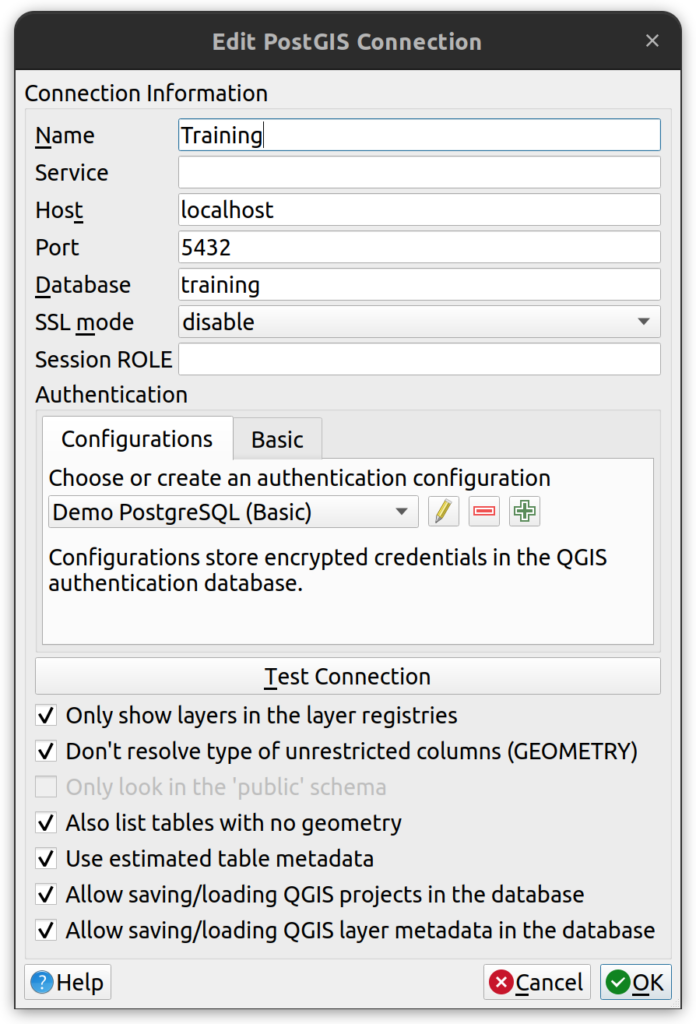
This tutorial demonstrates how to connect to PostGIS from QGIS. To connect QGIS to a PostGIS database, use the Browser panel to create a new PostgreSQL connection. You’ll need to provide the host, port, database name, and a QGIS authentication configuration—not basic auth. Authentication settings are stored securely within your QGIS profile and include a username, password, and a shared Authentication ID to prevent “Unavailable Layer” errors across users. Once the credentials are configured, use the “Test Connection” button to verify access, then enable all relevant checkboxes and save. Your new PostGIS connection will appear under the PostgreSQL section in the QGIS Browser.
To connect to PostGIS from QGIS, follow these steps:
1. Open QGIS and make sure the Browser panel is open.
2. In QGIS, right-click on PostgreSQL and click on “New Connection”. Enter the following parameters.
- Connection Name: A name for your connection.
- Host: Enter the IP address or hostname.
- Port: Enter the database server’s port.
- Database: Enter the name of the database. You may connect to multiple databases at the same time, but each database requires its own connection in QGIS.
- DO NOT USE BASIC AUTHENTICATION. Second tab in the Authentication section with the label “Basic” should not be used.
- Under the Authentication section, click on the “Configurations” tab. All connections must be made to the DB using a QGIS configuration, which is a way to save credentials for different connections inside your personal QGIS profile.
- Create a New Connection. Click on the green plus sign button to create a new connection.
- Master Password. If prompted to enter a master password, do so and record the password in your personal database manager. The master password in QGIS is only used to protect your passwords. You will likely never use it again, but keep it handy just in case.
- Name: name the authentication record (e.g. Acme Inc PostgreSQL Connection). You can use uppercase, lowercase, special characters, and numbers for the connection name.
- Basic Authentication. Select basic authentication from the dropdown.
- Username: enter your username.
- Password: Enter your password. Click the Show checkbox to make sure there are no trailing spaces in your password.
- Authentication ID: this is VERY IMPORTANT. If all users in an organization use the same authentication ID, they will not get “Unavailable Layer” errors when opening projects created by other users.
- Note. You can use the same authentication record for multiple connections.
- Test Connection. At this point you can press “Test Connection” to make sure that you have the correct credentials and database. If you get an error, review the previous steps. Some common problems include the wrong host IP or name and passwords with trailing spaces.
- Checkboxes. If the connection test is successful, check all the checkboxes (one will grey out) and click ok.
- The new connection should now be in the Browser panel under PostgreSQL.