Data Auditing in PostgreSQL
Data auditing in PostgreSQL is a way to track changes on database tables by logging all actions (CREATE, INSERT, UPDATE, DELETE) to another table. In PostgreSQL, auditing tables and the associated trigger functions can be created in many ways and there are also extensions that can be used for auditing. The method presented in this tutorial is one of many possible approaches to data auditing.
Data auditing requires four main components:
- A private schema to store the audit table. This table can also live in an “admin” schema or something similar, but it is good practice to keep it private.
- An audit table to store logged actions.
- An audit trigger function to copy values from another table to the audit table.
- An audit trigger to fire the audit trigger function.
What You’ll Learn in this Tutorial
- How to log table-level actions to an audit table using a trigger function.
Prerequisites
- Access to a PostgreSQL database with permission to create schema, tables, and other database objects. The PostGIS spatial extension will be needed on this database.
- Install PGAdmin4 or a similar application to execute SQL statements OR access to the PSQL command line interface.
1. Audit Table Example
In this example, you will create a test table, an audit table to store a log of all actions, an audit trigger function, and a trigger on the test table.
Step 1: Create schemas
In a training database, execute the following SQL statements to create schemas called audit and test.
CREATE SCHEMA audit;
CREATE SCHEMA test;
Step 2: Create a test table
Execute the following SQL statements to create a table called test_layer in the test schema.
CREATE TABLE test.test_layer (
     id SERIAL PRIMARY KEY,
     geom geometry(polygon,3857),
     field1 VARCHAR,
     field2 NUMERIC,
     field4 INTEGER,
     field5 BOOLEAN
 );
Step 3: Create the audit table to store logged actions
Execute the following SQL statement to create the logged_actions table in the audit schema. This table will store a record of all actions made in the test_layer.
CREATE TABLE audit.logged_actions (
    schema_name text not null,
    table_name text not null,
    user_name text,
    action_tstamp timestamp with time zone not null default current_timestamp,
    action TEXT NOT NULL check (action in ('I','D','U')),
    original_data text,
    new_data text,
    query text
) with (fillfactor=100);
revoke all on audit.logged_actions from public;
create index logged_actions_schema_table_idx
on audit.logged_actions(((schema_name||'.'||table_name)::TEXT));
create index logged_actions_action_tstamp_idx
on audit.logged_actions(action_tstamp);
create index logged_actions_action_idx
on audit.logged_actions(action);
Step 4: Create the audit trigger function
Execute the following SQL statement to create the audit trigger function.
CREATE OR REPLACE FUNCTION audit.if_modified_func() RETURNS trigger AS $body$
DECLARE
    v_old_data TEXT;
    v_new_data TEXT;
BEGIN
    if (TG_OP = 'UPDATE') then
        v_old_data := ROW(OLD.*);
        v_new_data := ROW(NEW.*);
        insert into audit.logged_actions (schema_name,table_name,user_name,action,original_data,new_data,query)
        values (TG_TABLE_SCHEMA::TEXT,TG_TABLE_NAME::TEXT,session_user::TEXT,substring(TG_OP,1,1),v_old_data,v_new_data, current_query());
        RETURN NEW;
    elsif (TG_OP = 'DELETE') then
        v_old_data := ROW(OLD.*);
        insert into audit.logged_actions (schema_name,table_name,user_name,action,original_data,query)
        values (TG_TABLE_SCHEMA::TEXT,TG_TABLE_NAME::TEXT,session_user::TEXT,substring(TG_OP,1,1),v_old_data, current_query());
        RETURN OLD;
    elsif (TG_OP = 'INSERT') then
        v_new_data := ROW(NEW.*);
        insert into audit.logged_actions (schema_name,table_name,user_name,action,new_data,query)
        values (TG_TABLE_SCHEMA::TEXT,TG_TABLE_NAME::TEXT,session_user::TEXT,substring(TG_OP,1,1),v_new_data, current_query());
        RETURN NEW;
    else
        RAISE WARNING '[AUDIT.IF_MODIFIED_FUNC] - Other action occurred: %, at %',TG_OP,now();
        RETURN NULL;
    end if;
EXCEPTION
    WHEN data_exception THEN
        RAISE WARNING '[AUDIT.IF_MODIFIED_FUNC] - UDF ERROR [DATA EXCEPTION] - SQLSTATE: %, SQLERRM: %',SQLSTATE,SQLERRM;
        RETURN NULL;
    WHEN unique_violation THEN
        RAISE WARNING '[AUDIT.IF_MODIFIED_FUNC] - UDF ERROR [UNIQUE] - SQLSTATE: %, SQLERRM: %',SQLSTATE,SQLERRM;
        RETURN NULL;
    WHEN others THEN
        RAISE WARNING '[AUDIT.IF_MODIFIED_FUNC] - UDF ERROR [OTHER] - SQLSTATE: %, SQLERRM: %',SQLSTATE,SQLERRM;
        RETURN NULL;
END;
$body$
LANGUAGE plpgsql
SECURITY DEFINER
SET search_path = pg_catalog, audit;
Step 5: Create the audit trigger
Execute the following SQL statement to create the trigger on test_layer. Once executed, all action on test_layer will be logged to the audit.logged_actions table.
CREATE TRIGGER audit_trigger
    AFTER INSERT OR UPDATE OR DELETE
    ON test.test_layer
    FOR EACH ROW
    EXECUTE PROCEDURE audit.if_modified_func();
Step 6: Test the audit log
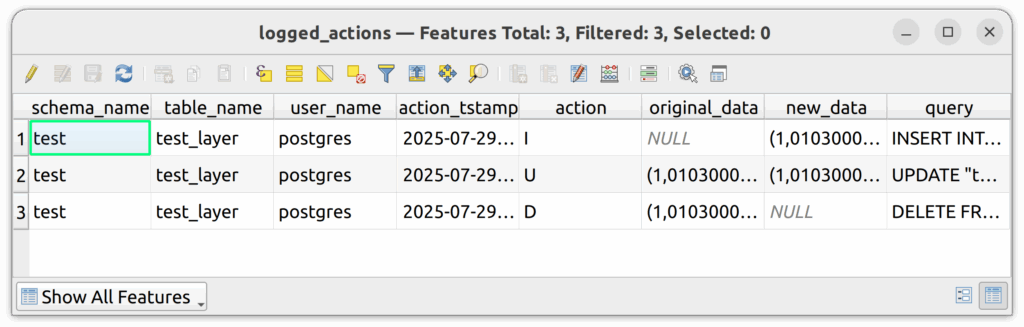
6.1. In QGIS, edit the test_layer by adding a new polygon.
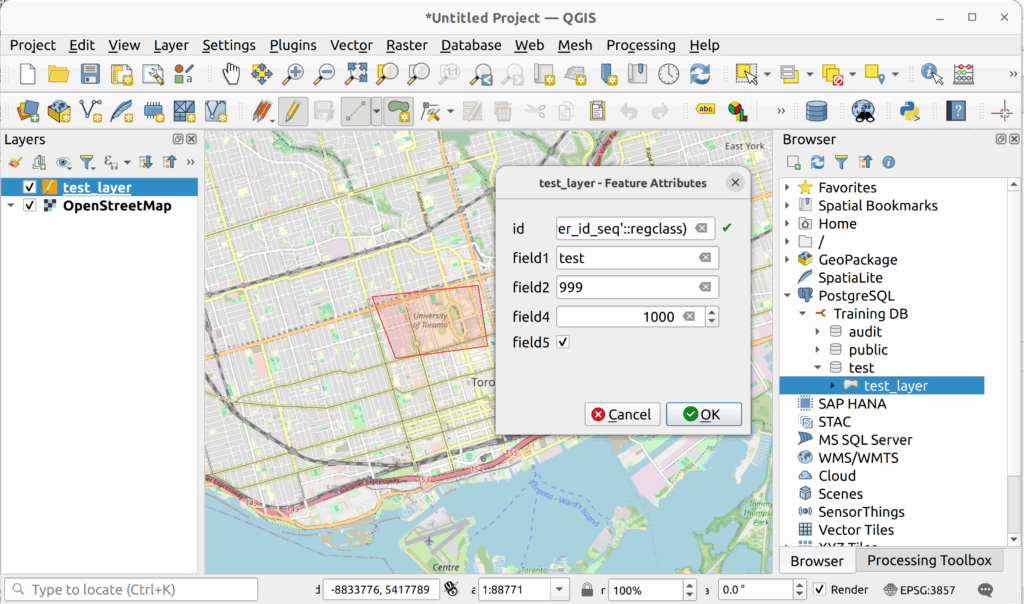
6.2. Refresh your database connection and expand the audit schema in the QGIS Browser Panel. You should see the new logged_actions table. If you do not see it, it is possible that your database connection is not set to show non-spatial tables.
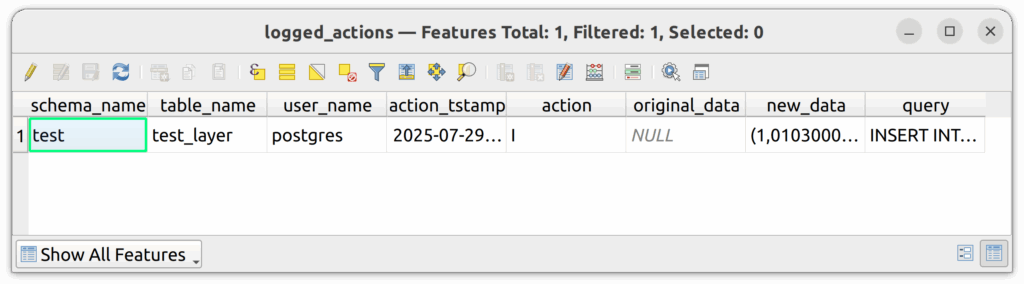
6.3. Add the logged_actions table to the project and then open it with the Attributes Table tool in QGIS.

6.4. You should see your logged INSERT action.
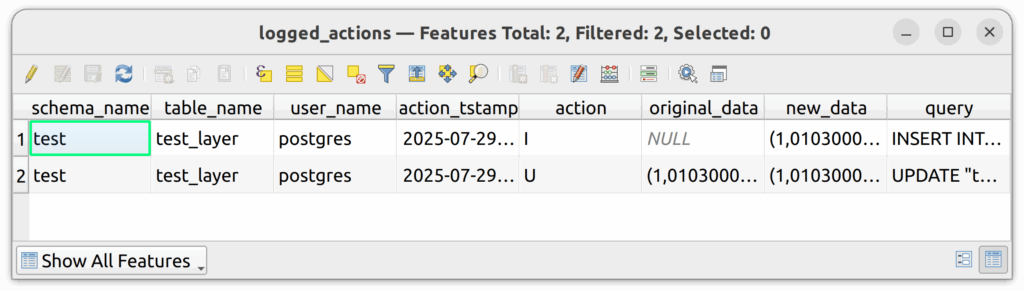
6.5. Edit the polygon in QGIS and save your changes.
6.6. Press refresh on the attributes table of the logged_actions table and you should now see two rows, one for the insert and one for the update.
6.7. Delete a polygon from the table, save the changes, and then refresh the logged_actions table. You should now see three rows.
2. Data auditing reports
It is helpful to create a number of database views that summarize the logged_actions table. Specifically, the following database views show the total number of logged actions by day or month by all users.
Total Daily Actions
CREATE VIEW audit.total_daily_actions as (
	SELECT action_tstamp::date as action_date, count(*) as total_actions
	FROM audit.logged_actions
	GROUP BY action_tstamp::date
	ORDER BY action_tstamp::date
);
Total Daily Actions by Type
CREATE VIEW audit.total_daily_actions_by_type as (
	WITH total_daily_inserts as (
		select action_tstamp::date as action_date, count(*) as total_insert_actions
		from audit.logged_actions
		WHERE action = 'I'
		GROUP BY action_tstamp::date
		ORDER BY action_tstamp::date
	), total_daily_updates as (
		select action_tstamp::date as action_date, count(*) as total_update_actions
		from audit.logged_actions
		WHERE action = 'U'
		GROUP BY action_tstamp::date
		ORDER BY action_tstamp::date
	), total_daily_delete as (
		select action_tstamp::date as action_date, count(*) as total_delete_actions
		from audit.logged_actions
		WHERE action = 'D'
		GROUP BY action_tstamp::date
		ORDER BY action_tstamp::date
	)
	SELECT
	CASE
		WHEN a.action_date IS NOT NULL THEN a.action_date
		WHEN a.action_date IS NULL THEN b.action_date
		WHEN a.action_date IS NULL AND b.action_date IS NULL THEN c.action_date
	ELSE NULL END as action_date,

CASE
     WHEN a.total_insert_actions IS NULL THEN 0 ELSE a.total_insert_actions
END,

CASE
     WHEN b.total_update_actions IS NULL THEN 0 ELSE b.total_update_actions
END,

CASE
     WHEN c.total_delete_actions IS NULL THEN 0 ELSE c.total_delete_actions
END

FROM total_daily_inserts a
FULL OUTER JOIN total_daily_updates b on a.action_date = b.action_date
FULL OUTER JOIN total_daily_delete c on a.action_date = c.action_date
);
Total Monthly Actions
CREATE VIEW audit.total_monthly_actions as (
	select date_trunc('month', action_tstamp) as action_date, count(*) as total_actions
	from audit.logged_actions
	GROUP BY date_trunc('month', action_tstamp)
	ORDER BY date_trunc('month', action_tstamp)
);
Monthly Actions by All Users
CREATE VIEW audit.monthly_actions_by_all_users as (
	--Monthly actions by all users
	select date_trunc('month', action_tstamp) as action_date, count(*) as total_actions, user_name
	from audit.logged_actions
	GROUP BY date_trunc('month', action_tstamp), user_name
	ORDER BY date_trunc('month', action_tstamp), user_name
);
3. Data auditing best practices
The following are some best practices to follow when working with audit tables and related views.
- Only administrators should have access to the logged_actions table and associated views. Set the schema, table, and view security accordingly.
- If anyone runs a SQL statement to update all rows in a large table, the audit table will reflect this action. For example, if 100,000 rows were updated with a new area column, there would be 100,000 new rows in the audit table.
- Audit tables can be used to restore data, depending on the complexity of the table. However, it is still best to restore data from backups, if possible. If a few values were changed or deleted, an audit table is a great place to recover those values, but if hundreds or thousands of rows were deleted, it is best to restore those values by restoring a backup to another location.
- Only permit administrators to access the audit table. All other users should not be able to see the audit table.
How can we help?
Contact us today to schedule a free consultation with a member of our team.